Password rules you can see yourself passing
A security review asked for stricter password rules. My work was what the review didn't cover: which error shows when, what to do about short names, and staying compatible with other connected Daimler sites.
- scale
- 5
- rules, checked as you type
- change
- 2 → 1
- server-side checks, one message
- constraint
- 1
- security review that started it
my part
the only designer; built the working prototype in Claude Designprompted by a security review; crit with the wider design team; security and engineering own the server-side checksprototype
Excelerator’s Create Account page had password rules, but you couldn’t see them. You typed a password, pressed Continue, and only then found out it didn’t pass, from an error listing rules you’d never been shown.
Then a security review asked for stricter rules: a longer minimum, a higher maximum, a check against common and breached passwords, and a check against the first thing attackers try, which is your own name, email or company. The rules were right. But nobody had thought about what a person sees while trying to meet them, and with more rules to meet, finding out after you submit would only get worse.
So I designed a panel that shows every rule up front and checks each one as you type, and worked through the parts the review didn’t cover.
Try it
What the review didn’t cover
- Which error shows, and when. Rules you can fix while typing, like length, a missing number or your own name, should fail right away. Rules only the server can check, like a breached password or one you’ve used before, should fail once on submit, as one message. Mix them up and the form flags problems you can’t see or fix.
- Short names. “Doesn’t contain your name” sounds simple. But if your name is Bo Li, blocking every password with “bo” or “li” in it blocks most of the dictionary. So the check ignores pieces shorter than four letters and looks for the joined name: “boli” fails, “bolt” doesn’t.
- Every other place you set a password. Create Account isn’t the only one. I audited the rest of the site and found that some of them didn’t agree with each other, let alone with the new rules. One policy and one panel, everywhere a password gets typed.
- Other Daimler sites. Excelerator is connected to other Daimler sites that have their own password requirements, and we have to meet those too. That’s why two rules stayed: upper case, lower case and a number, and no more than three repeating characters.
How the panel works
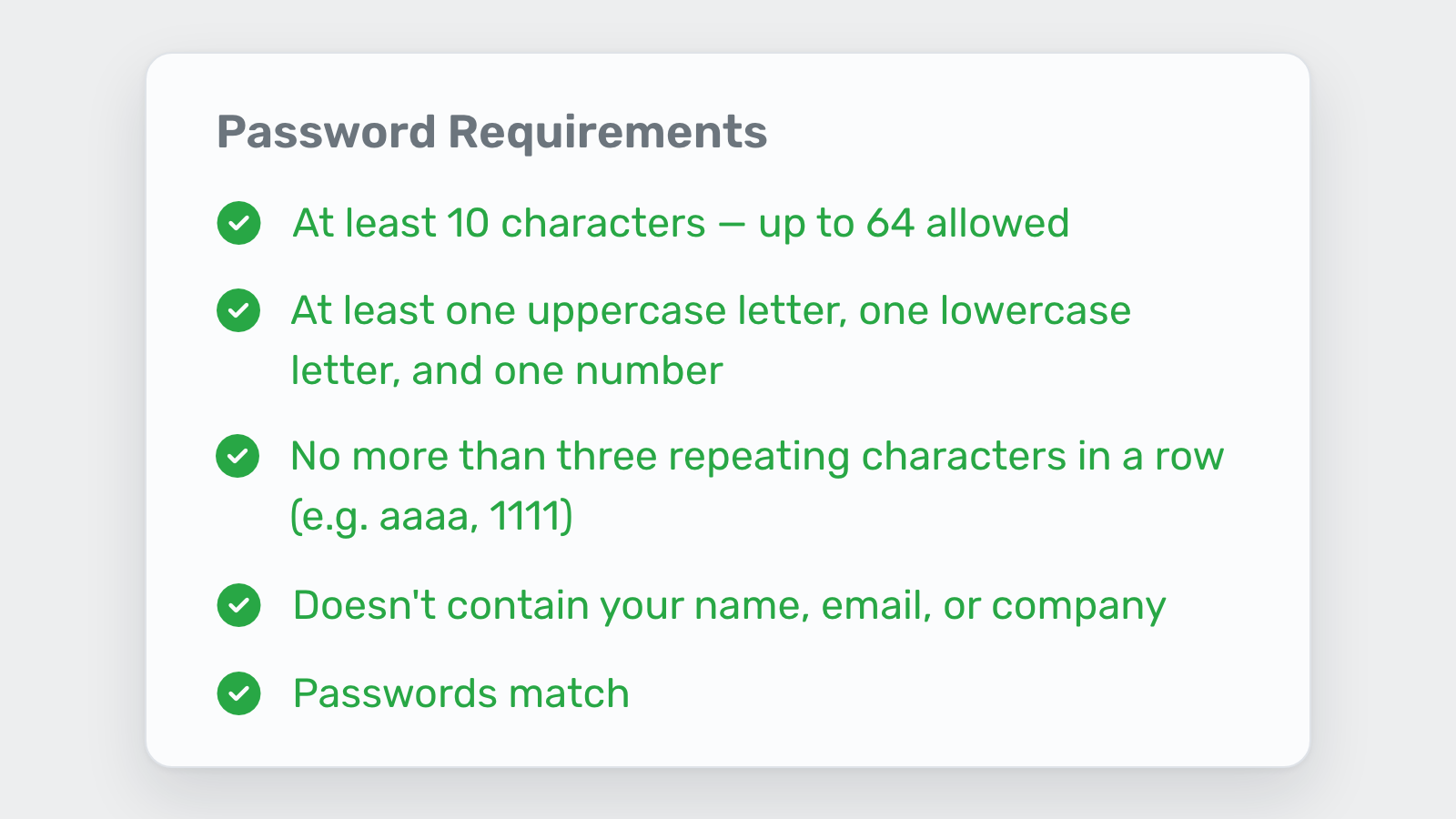
Every rule starts as an empty circle and turns into a check or a cross as you type. The text changes to tell you what to do, like “Keep it under 64 characters (70 entered),” so you’re not rereading the rule.
- 10 to 64 characters. The maximum is there on purpose. If a rule only says “at least,” people aim for the minimum.
- Upper case, lower case and a number. Required by the connected Daimler sites, on one line instead of three.
- No more than three of the same character in a row. Also required by the connected sites, in plain words with examples (aaaa, 1111).
- Doesn’t contain your name, email or company. It reads the fields you’ve already filled in, including combinations, so “jackmarigold” fails for Jack Marigold even though neither word does on its own.
- Passwords match. Neutral until you’ve typed in both boxes, then it tells you: “Passwords don’t match yet.”
Continue stays disabled until all five pass. The two checks a browser can’t run, common or breached passwords and your own old ones, happen on submit and come back as one message: “This password can’t be used.” It never says which list you hit.
The line under the checklist is the part I care about most: “Spaces are welcome. A passphrase like Blue truck hauls 9 tons is long, memorable, and strong.” Years of forms have taught people that a password should be a string of random characters. Telling them a sentence works, with an example from their own world, changes what they type.
The meter I didn’t ship
I built five strength meters for this panel: a segmented bar, a continuous fill, dots, a badge and an icon with a scale. They all had the same problem. With a meter and a checklist on the same panel, people didn’t know which one to look at to tell if their password was good enough. “Fair” next to five green checks makes no sense, and “Strong” next to a red cross is worse. So we scrapped it. The checklist already tells you what you still need to fix.
Here are the five I built and didn’t ship. Type a password and they all react at once.