I’m James, a software designer living in Charlotte, NC. Currently building the “Amazon of truck parts” at Daimler.

Recent History

Ahead for iOS

2026 - present

Building an app that uses AI to smartly bring together Health, Email, Calendar, Weather and Reminders. Anything that helps you get ahead.Status: Live

Daimler

2025 - present

As a lead designer, I lead efforts to improve our e-commerce and truck management platform to keep trucks on the road.

Xbox

2021 - 2025

As a senior designer, I worked across teams to improve the game developer experience from idea to launch.

Work log

Wins, WIPs, Whims

Purchase coverage for a truck fleet

Win • Oct 2025 - Feb 2026

Our fleet customers were losing valuable time purchasing coverage for one truck at a time. After some conversations with customers, we learned the most efficient way of doing this is via document upload. I designed a brand new purchase flow for multiple trucks.

Read more

Easier truck fleet management

WIP • Dec 2025 - ongoing

After an effort from the business to give access to the “My Garage” section of the site to anyone with an account (from 5% to 100%), a new group of customers had issues viewing the information that was important to them. We also wanted to help them make better decisions on how to shop for parts and services for those trucks.

Our fleet management platform was initially built to only show a small amount of information. So I started at the beginning to think through the future of this platform and designed a future state to be scalable enough to hold lots of types on information. More dense, more helpful, with input from existing customers.

Then reduced, reduced, reduced until I had something we could deliver on a much shorter timeframe.

Using AI to solve a communication problem

Feb 2026

We had this miscommunication problem with our developers. They wanted us to design screens at two, three and sometimes four different breakpoints to account for specific elements on the page not behaving properly when the screen was resized.

By hooking up the design system to Figma Make, giving it some specific instructions, and pointing it to specific desktop components in the prompt, I was able to have it create new mobile versions of those components so that we could move them into the design system.

On top of that, we were able to better show developers how elements were to behave once they’re in production. With this small change in our workflow, we eliminated ~20min on average of total back-and-forth communication with our developers per work item.

Designing more helpful solutions

Whim (Feb 2026)

Sometimes sellers on our platform have ideas of features they want that are at odds with what we think is the best experience. They may have an idea of how they want something to work, unaware that there’s a better way.

They’ll ask for a faster horse when we know we can deliver them a car.

For instance, during the “Multi-VIN” project, they asked for a way to compare coverages against each other. After some probing and some iteration, I realized that what they really wanted was more visibility into the current truck coverages.

It was information that was often hidden from them. So I put that info front and center which alleviated that concern and provided a path forward.

Designing design processes (an assist)

Win (Feb 2026)

One of the big problems we were facing was losing time to late-stage design changes. We weren’t getting the right feedback early enough in the process.

Because our designs touch so many departments, the time toward the end of the design process is super critical. It should be the time when we’re dialing in the details. So when new people come into the process at this stage with new information, it’s pretty disruptive.

So I suggested we make a change. First off, we need a better understanding of who needs to sign off on decisions for which products and features. One of the things I discovered while at Microsoft that was helpful for group alignment was a visual mapping of the team leads and their area of expertise.

That, on top of an idea that my manager had --presenting design overviews in team lead meetings for full visibility-- we had something we thought would help save us time in our design process.

We also proposed a couple other changes to the business process:

  • Meetings where UX is at all involved should always have some UI for everyone to react to
  • Meetings agendas need to be updated and the correct people need to be notified that they need to be in the meeting

Improving the business process improved our design process in a beautiful little flywheel.

Designing for trust

Mar 2026 - ongoing

E-commerce isn’t all about conversions. To be able to convert people, there needs to be a baseline level of trust. There are legal and reputational ramifications to the design decisions we make. Especially to a platform of our size. Some of the most important ones I consider are:

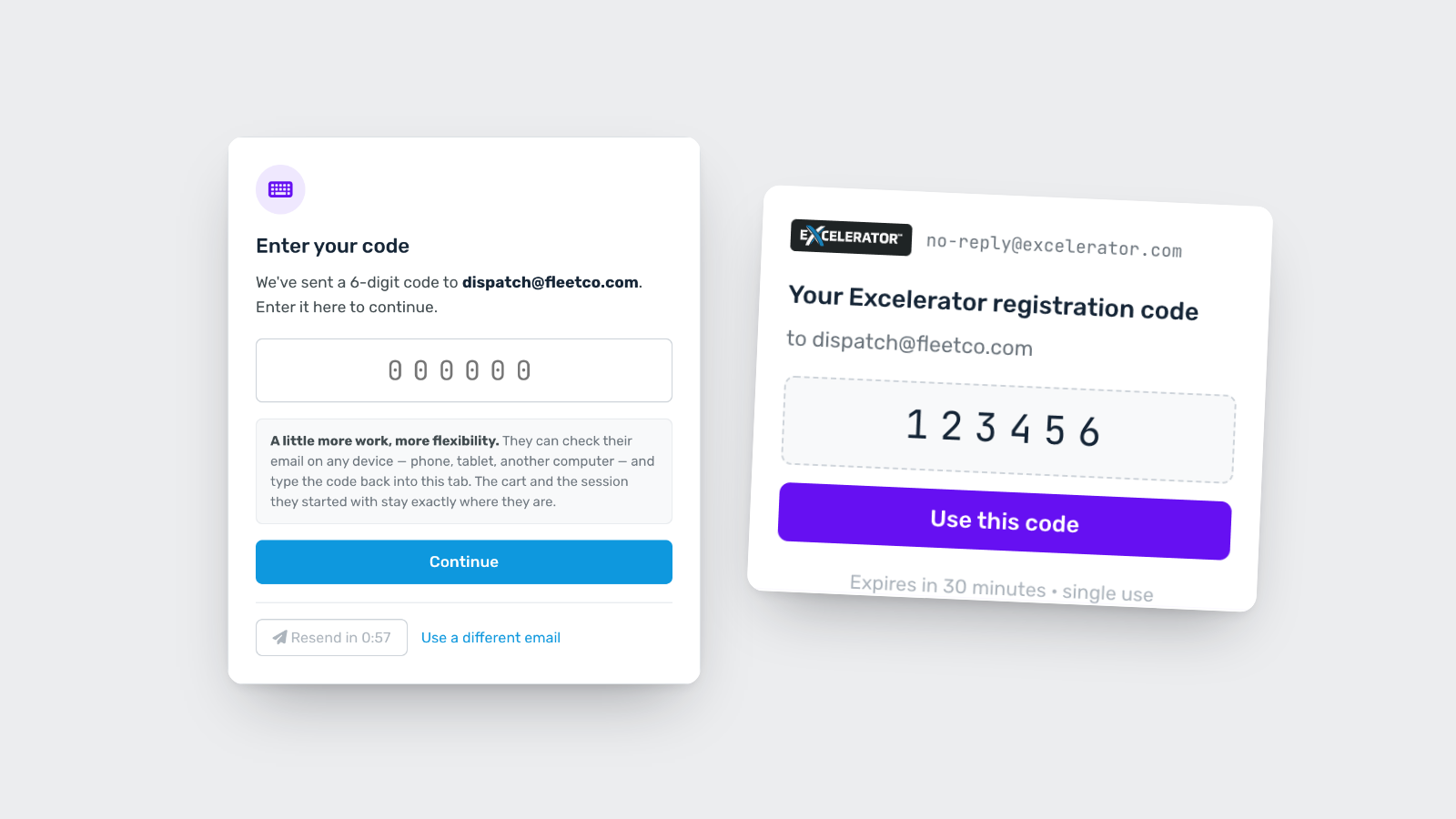
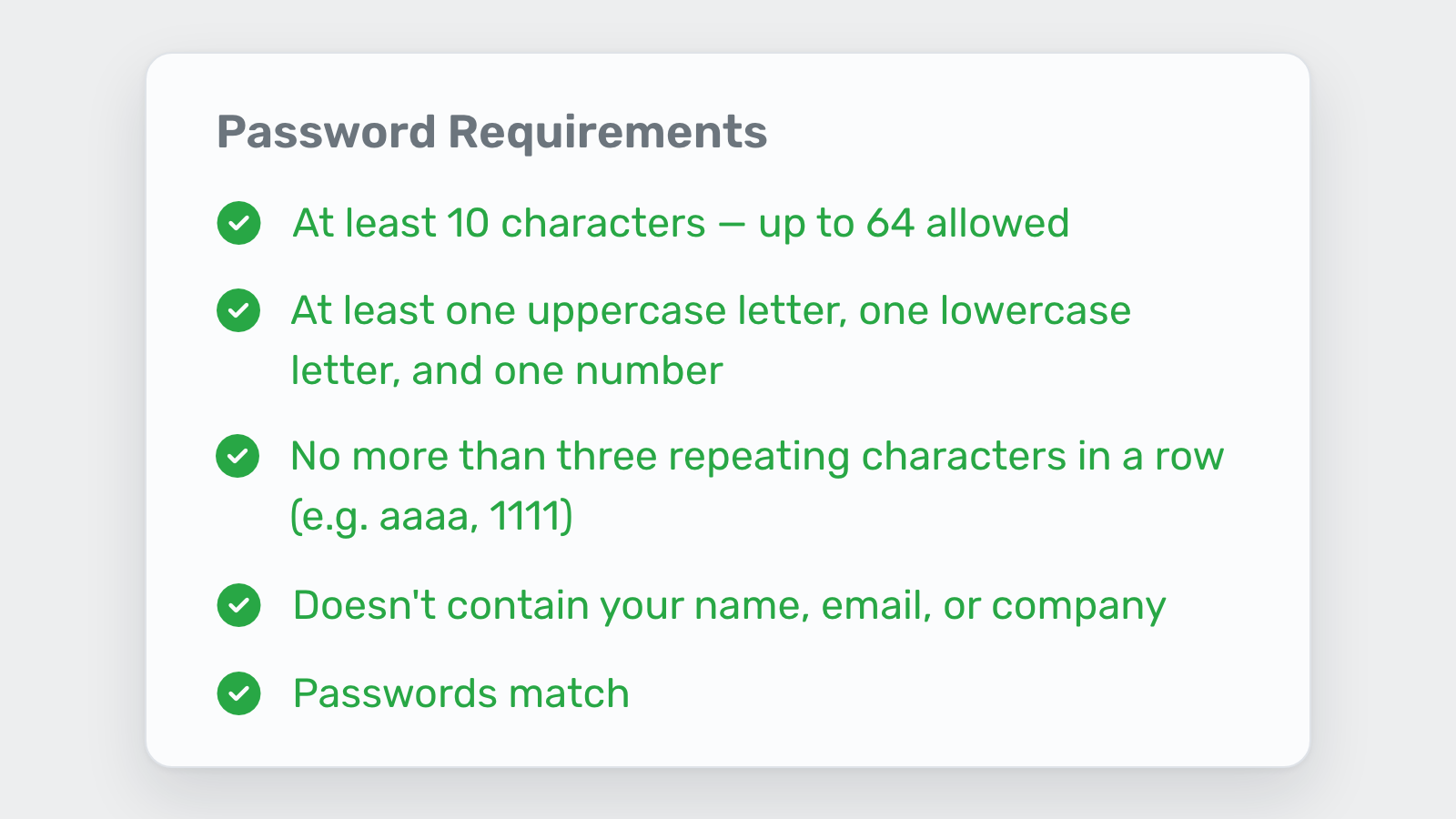
  1. Data transparencyTelling people how we’re using their data in the context of what their doing gives them that extra assuredness when purchasing.
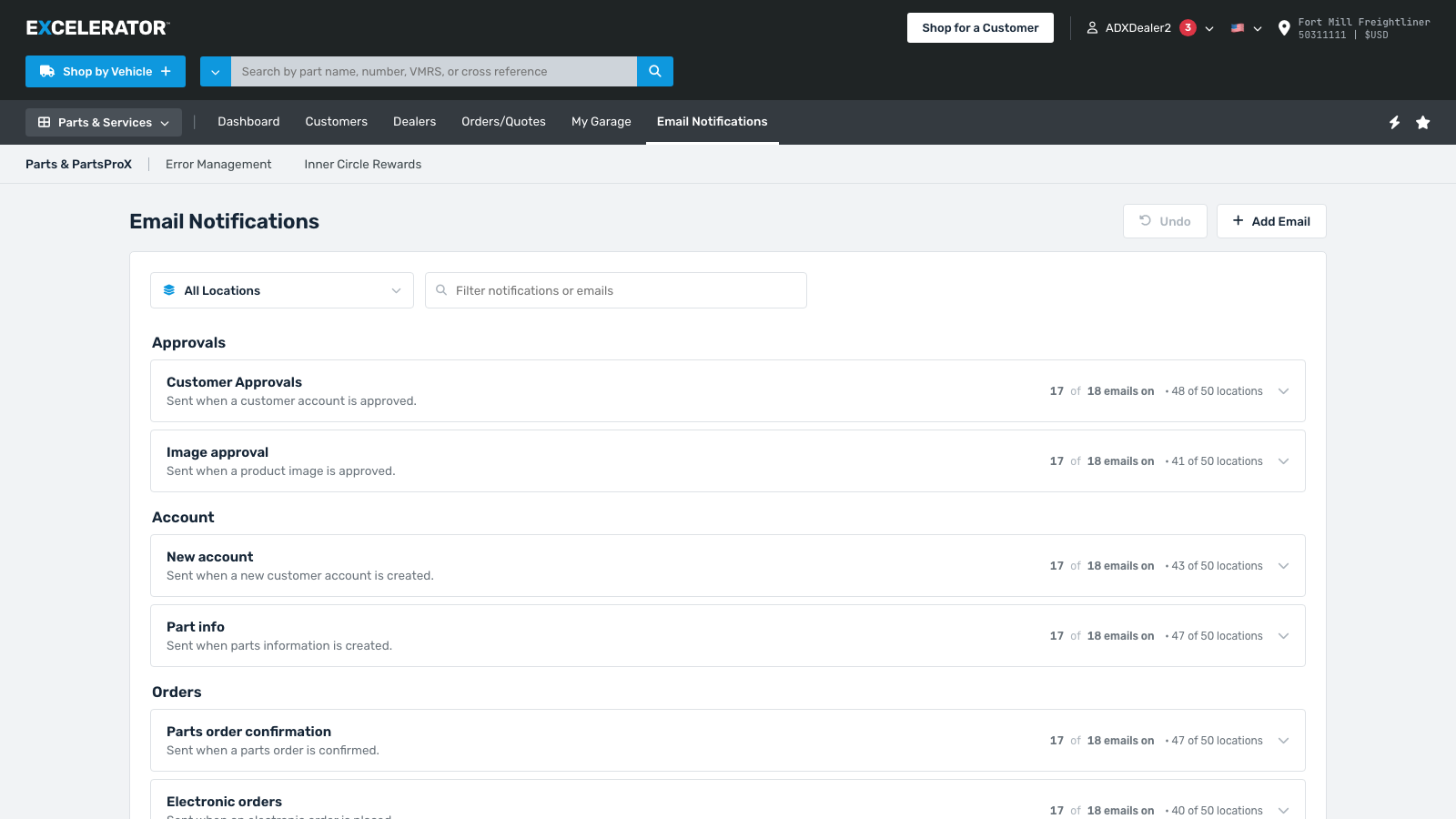
  2. Price visibility (example shown above)Showing the right price to the right people. We have about 15 user roles, so we’re meticulous when thinking about visibility from role to role. I design for each role separately when needed.
  3. FairnessEnsuring no seller on our platform gets preferential treatment. We have over 1,700 parts suppliers on our platform who all want to sell their products. We can’t play favorites. Any products or brands that are listed are sorted in a way that isn’t biased.

Documenting iterations

Feb 2026 - present

One of my favorite recent changes to my design process is documenting how things change over time.

Before, I was just moving old iterations to an archive section on the canvas to reference later if I need to. The problem was there was never any context to why I chose the direction I chose so I couldn’t communicate that to someone else if I wanted to.

Now, if I go in a direction I do a quick write-up and place it on the canvas. And instead of moving it to a “junk drawer” I include it right along side the current iterations. So now I can present the full picture of how the designs changed over time and what inputs caused it to change.

A small change but super helpful.

Learning a new domain quickly

Whim (Feb 2026 - present)

I’ve worked in a handful of different industries. Gaming, Automotive, E-Commerce, Financial -- the list goes on.

Early on, I would just try to cram as much information as I could without any kind of plan. I thought that if I hear enough information I’d eventually understand it and how to use it. It worked OK, but I forgot a lot of information.

Understand business constraints

Now, I take a more targeted approach. When I started at Daimler, I made a point of understanding the business processes that provide a lot of the constraints that guide the design process. For example, there’s a system called “OWL” that’s referenced a lot. It stands for Online Warranty Links; which is the system that provides all the warranty and claims information related to vehicle parts.

OWL is slow and outdated but it’s one of the systems we rely on to generate warranty info for customers. So understanding what it can and can’t do helps me design against it.

Listening tour

Another thing I do now is talk to people early to gain some of the institutional knowledge available at a company. Within the first 3 months of starting at Daimler I had 9-10 conversations with people across business, technical and sales.

I then fed those notes to Claude to understand how their comments could relate to me as a designer. I just do this over and over again.

Generalize

I also try to repeat back any new information and generalize it. Metaphors are my best friend. For instance, instead of saying “we need a customer account to be connected to a dealer account with their DTNA ID”, I’ll rephrase it in meetings and in my head as “we need to link two user accounts together” -- that way I can more easily call on my experience in other domains.

What if product requirements could double as prompts? An experiment with Figma Make.

Feb 2026

In a world not far from this one, anyone could copy/paste some notes about a product or a feature and get a pixel-perfect design with accompanying code ready to be published on the web.

There are some constraints right now with existing platforms and code bases but I wanted to explore how we get part of the way there as quickly as possible.

I started with an existing requirement doc and iterated to produce 3 different designs based on what I knew to be true about our user base. I documented what changes I made, how AI reasoned through it, and ultimately what I was able to take from it and actually implement.

View Slides

Simplifying remote development with Xbox PC Tools

May 2025

Game developers often need to test their builds on actual Xbox hardware, but being physically present at a console isn't always practical. Xbox PC Remote Tools solves this by allowing developers to connect to and control Xbox consoles remotely from their PCs.

I worked on designing an intuitive interface that streamlines the connection process, file deployment, and remote debugging workflow. The tools needed to be reliable enough for daily development use while remaining accessible to developers new to Xbox development.

The result was a significant reduction in iteration time for game studios, enabling faster testing cycles and more efficient collaboration across distributed teams.

Read more

Copilot for game studios

May 2025

What if a game studio could leverage Copilot to pull players’ highlights (with consent ofc), format and post them to socials to help build the community around a new game?

This is an exploration I did a while ago while working on the game dev side at Xbox. One of the big things that helps new games gain traction is community and word of mouth.

More fun on desktop

I’m James, a software designer living in Charlotte, NC. Currently building the “Amazon of truck parts” at Daimler.

Recent History

Ahead for iOS

2026 - present

Building an app that uses AI to smartly bring together Health, Email, Calendar, Weather and Reminders. Anything that helps you get ahead.Status: Live

Daimler

2025 - present

As a lead designer, I lead efforts to improve our e-commerce and truck management platform to keep trucks on the road.

Xbox

2021 - 2025

As a senior designer, I worked across teams to improve the game developer experience from idea to launch.

Work log

Wins, WIPs, Whims

Purchase coverage for a truck fleet

Win • Oct 2025 - Feb 2026

Our fleet customers were losing valuable time purchasing coverage for one truck at a time. After some conversations with customers, we learned the most efficient way of doing this is via document upload. I designed a brand new purchase flow for multiple trucks.

Read more

Easier truck fleet management

WIP • Dec 2025 - ongoing

After an effort from the business to give access to the “My Garage” section of the site to anyone with an account (from 5% to 100%), a new group of customers had issues viewing the information that was important to them. We also wanted to help them make better decisions on how to shop for parts and services for those trucks.

Our fleet management platform was initially built to only show a small amount of information. So I started at the beginning to think through the future of this platform and designed a future state to be scalable enough to hold lots of types on information. More dense, more helpful, with input from existing customers.

Then reduced, reduced, reduced until I had something we could deliver on a much shorter timeframe.

Using AI to solve a communication problem

Feb 2026

We had this miscommunication problem with our developers. They wanted us to design screens at two, three and sometimes four different breakpoints to account for specific elements on the page not behaving properly when the screen was resized.

By hooking up the design system to Figma Make, giving it some specific instructions, and pointing it to specific desktop components in the prompt, I was able to have it create new mobile versions of those components so that we could move them into the design system.

On top of that, we were able to better show developers how elements were to behave once they’re in production. With this small change in our workflow, we eliminated ~20min on average of total back-and-forth communication with our developers per work item.

Designing more helpful solutions

Whim (Feb 2026)

Sometimes sellers on our platform have ideas of features they want that are at odds with what we think is the best experience. They may have an idea of how they want something to work, unaware that there’s a better way.

They’ll ask for a faster horse when we know we can deliver them a car.

For instance, during the “Multi-VIN” project, they asked for a way to compare coverages against each other. After some probing and some iteration, I realized that what they really wanted was more visibility into the current truck coverages.

It was information that was often hidden from them. So I put that info front and center which alleviated that concern and provided a path forward.

Designing design processes (an assist)

Win (Feb 2026)

One of the big problems we were facing was losing time to late-stage design changes. We weren’t getting the right feedback early enough in the process.

Because our designs touch so many departments, the time toward the end of the design process is super critical. It should be the time when we’re dialing in the details. So when new people come into the process at this stage with new information, it’s pretty disruptive.

So I suggested we make a change. First off, we need a better understanding of who needs to sign off on decisions for which products and features. One of the things I discovered while at Microsoft that was helpful for group alignment was a visual mapping of the team leads and their area of expertise.

That, on top of an idea that my manager had --presenting design overviews in team lead meetings for full visibility-- we had something we thought would help save us time in our design process.

We also proposed a couple other changes to the business process:

  • Meetings where UX is at all involved should always have some UI for everyone to react to
  • Meetings agendas need to be updated and the correct people need to be notified that they need to be in the meeting

Improving the business process improved our design process in a beautiful little flywheel.

Designing for trust

Mar 2026 - ongoing

E-commerce isn’t all about conversions. To be able to convert people, there needs to be a baseline level of trust. There are legal and reputational ramifications to the design decisions we make. Especially to a platform of our size. Some of the most important ones I consider are:

  1. Data transparencyTelling people how we’re using their data in the context of what their doing gives them that extra assuredness when purchasing.
  2. Price visibility (example shown above)Showing the right price to the right people. We have about 15 user roles, so we’re meticulous when thinking about visibility from role to role. I design for each role separately when needed.
  3. FairnessEnsuring no seller on our platform gets preferential treatment. We have over 1,700 parts suppliers on our platform who all want to sell their products. We can’t play favorites. Any products or brands that are listed are sorted in a way that isn’t biased.

Documenting iterations

Feb 2026 - present

One of my favorite recent changes to my design process is documenting how things change over time.

Before, I was just moving old iterations to an archive section on the canvas to reference later if I need to. The problem was there was never any context to why I chose the direction I chose so I couldn’t communicate that to someone else if I wanted to.

Now, if I go in a direction I do a quick write-up and place it on the canvas. And instead of moving it to a “junk drawer” I include it right along side the current iterations. So now I can present the full picture of how the designs changed over time and what inputs caused it to change.

A small change but super helpful.

Learning a new domain quickly

Whim (Feb 2026 - present)

I’ve worked in a handful of different industries. Gaming, Automotive, E-Commerce, Financial -- the list goes on.

Early on, I would just try to cram as much information as I could without any kind of plan. I thought that if I hear enough information I’d eventually understand it and how to use it. It worked OK, but I forgot a lot of information.

Understand business constraints

Now, I take a more targeted approach. When I started at Daimler, I made a point of understanding the business processes that provide a lot of the constraints that guide the design process. For example, there’s a system called “OWL” that’s referenced a lot. It stands for Online Warranty Links; which is the system that provides all the warranty and claims information related to vehicle parts.

OWL is slow and outdated but it’s one of the systems we rely on to generate warranty info for customers. So understanding what it can and can’t do helps me design against it.

Listening tour

Another thing I do now is talk to people early to gain some of the institutional knowledge available at a company. Within the first 3 months of starting at Daimler I had 9-10 conversations with people across business, technical and sales.

I then fed those notes to Claude to understand how their comments could relate to me as a designer. I just do this over and over again.

Generalize

I also try to repeat back any new information and generalize it. Metaphors are my best friend. For instance, instead of saying “we need a customer account to be connected to a dealer account with their DTNA ID”, I’ll rephrase it in meetings and in my head as “we need to link two user accounts together” -- that way I can more easily call on my experience in other domains.

What if product requirements could double as prompts? An experiment with Figma Make.

Feb 2026

In a world not far from this one, anyone could copy/paste some notes about a product or a feature and get a pixel-perfect design with accompanying code ready to be published on the web.

There are some constraints right now with existing platforms and code bases but I wanted to explore how we get part of the way there as quickly as possible.

I started with an existing requirement doc and iterated to produce 3 different designs based on what I knew to be true about our user base. I documented what changes I made, how AI reasoned through it, and ultimately what I was able to take from it and actually implement.

View Slides

Simplifying remote development with Xbox PC Tools

May 2025

Game developers often need to test their builds on actual Xbox hardware, but being physically present at a console isn't always practical. Xbox PC Remote Tools solves this by allowing developers to connect to and control Xbox consoles remotely from their PCs.

I worked on designing an intuitive interface that streamlines the connection process, file deployment, and remote debugging workflow. The tools needed to be reliable enough for daily development use while remaining accessible to developers new to Xbox development.

The result was a significant reduction in iteration time for game studios, enabling faster testing cycles and more efficient collaboration across distributed teams.

Read more

Copilot for game studios

May 2025

What if a game studio could leverage Copilot to pull players’ highlights (with consent ofc), format and post them to socials to help build the community around a new game?

This is an exploration I did a while ago while working on the game dev side at Xbox. One of the big things that helps new games gain traction is community and word of mouth.

More fun on desktop

Recent History

Ahead for iOS

2026 - present

Building an app that uses AI to smartly bring together Health, Email, Calendar, Weather and Reminders. Anything that helps you get ahead.

Download from the App Store

Daimler

2025 - present

As a lead designer, I lead efforts to improve our e-commerce and truck management platform to keep trucks on the road.

Xbox

2021 - 2025

As a senior designer, I worked across teams to improve the game developer experience from idea to launch.

Work log

Wins, WIPs, Whims

Purchase coverage for a truck fleet

Win (Oct 2025 - Feb 2026)

Our fleet customers were losing valuable time purchasing coverage for one truck at a time. After some conversations with customers, we learned the most efficient way of doing this is via document upload. I designed a brand new purchase flow for multiple trucks.

Read more

Easier truck fleet management

WIP (Dec 2025 - ongoing)

After an effort from the business to give access to the “My Garage” section of the site to anyone with an account (from 5% to 100%), a new group of customers had issues viewing the information that was important to them. We also wanted to help them make better decisions on how to shop for parts and services for those trucks.

Our fleet management platform was initially built to only show a small amount of information. So I started at the beginning to think through the future of this platform and designed a future state to be scalable enough to hold lots of types on information. More dense, more helpful, with input from existing customers.

Then reduced, reduced, reduced until I had something we could deliver on a much shorter timeframe.

Using AI to solve a communication problem

Whim (Feb 2026)

We had this miscommunication problem with our developers. They wanted us to design screens at two, three and sometimes four different breakpoints to account for specific elements on the page not behaving properly when the screen was resized.

By hooking up the design system to Figma Make, giving it some specific instructions, and pointing it to specific desktop components in the prompt, I was able to have it create new mobile versions of those components so that we could move them into the design system.

On top of that, we were able to better show developers how elements were to behave once they’re in production. With this small change in our workflow, we eliminated ~20min on average of total back-and-forth communication with our developers per work item.

Designing more helpful solutions

Whim (Feb 2026)

Sometimes sellers on our platform have ideas of features they want that are at odds with what we think is the best experience. They may have an idea of how they want something to work, unaware that there’s a better way.

They’ll ask for a faster horse when we know we can deliver them a car.

For instance, during the “Multi-VIN” project, they asked for a way to compare coverages against each other. After some probing and some iteration, I realized that what they really wanted was more visibility into the current truck coverages.

It was information that was often hidden from them. So I put that info front and center which alleviated that concern and provided a path forward.

Designing design processes (an assist)

Win (Feb 2026)

One of the big problems we were facing was losing time to late-stage design changes. We weren’t getting the right feedback early enough in the process.

Because our designs touch so many departments, the time toward the end of the design process is super critical. It should be the time when we’re dialing in the details. So when new people come into the process at this stage with new information, it’s pretty disruptive.

So I suggested we make a change. First off, we need a better understanding of who needs to sign off on decisions for which products and features. One of the things I discovered while at Microsoft that was helpful for group alignment was a visual mapping of the team leads and their area of expertise.

That, on top of an idea that my manager had --presenting design overviews in team lead meetings for full visibility-- we had something we thought would help save us time in our design process.

We also proposed a couple other changes to the business process:

  • Meetings where UX is at all involved should always have some UI for everyone to react to
  • Meetings agendas need to be updated and the correct people need to be notified that they need to be in the meeting

Improving the business process improved our design process in a beautiful little flywheel.

Designing for trust

WIP (Mar 2026 - ongoing)

E-commerce isn’t all about conversions. To be able to convert people, there needs to be a baseline level of trust. There are legal and reputational ramifications to the design decisions we make. Especially to a platform of our size. Some of the most important ones I consider are:

  1. Data transparencyTelling people how we’re using their data in the context of what their doing gives them that extra assuredness when purchasing.
  2. Price visibility (example shown above)Showing the right price to the right people. We have about 15 user roles, so we’re meticulous when thinking about visibility from role to role. I design for each role separately when needed.
  3. FairnessEnsuring no seller on our platform gets preferential treatment. We have over 1,700 parts suppliers on our platform who all want to sell their products. We can’t play favorites. Any products or brands that are listed are sorted in a way that isn’t biased.

Documenting iterations

Win (Feb 2026 - ongoing)

One of my favorite recent changes to my design process is documenting how things change over time.

Before, I was just moving old iterations to an archive section on the canvas to reference later if I need to. The problem was there was never any context to why I chose the direction I chose so I couldn’t communicate that to someone else if I wanted to.

Now, if I go in a direction I do a quick write-up and place it on the canvas. And instead of moving it to a “junk drawer” I include it right along side the current iterations. So now I can present the full picture of how the designs changed over time and what inputs caused it to change.

A small change but super helpful.

Learning a new domain quickly

Whim (Feb 2026 - ongoing)

I’ve worked in a handful of different industries. Gaming, Automotive, E-Commerce, Financial -- the list goes on.

Early on, I would just try to cram as much information as I could without any kind of plan. I thought that if I hear enough information I’d eventually understand it and how to use it. It worked OK, but I forgot a lot of information.

Understand business constraints

Now, I take a more targeted approach. When I started at Daimler, I made a point of understanding the business processes that provide a lot of the constraints that guide the design process. For example, there’s a system called “OWL” that’s referenced a lot. It stands for Online Warranty Links; which is the system that provides all the warranty and claims information related to vehicle parts.

OWL is slow and outdated but it’s one of the systems we rely on to generate warranty info for customers. So understanding what it can and can’t do helps me design against it.

Listening tour

Another thing I do now is talk to people early to gain some of the institutional knowledge available at a company. Within the first 3 months of starting at Daimler I had 9-10 conversations with people across business, technical and sales.

I then fed those notes to Claude to understand how their comments could relate to me as a designer. I just do this over and over again.

Generalize

I also try to repeat back any new information and generalize it. Metaphors are my best friend. For instance, instead of saying “we need a customer account to be connected to a dealer account with their DTNA ID”, I’ll rephrase it in meetings and in my head as “we need to link two user accounts together” -- that way I can more easily call on my experience in other domains.

What if product requirements could double as prompts? An experiment with Figma Make.

Whim (Feb 2026)

In a world not far from this one, anyone could copy/paste some notes about a product or a feature and get a pixel-perfect design with accompanying code ready to be published on the web.

There are some constraints right now with existing platforms and code bases but I wanted to explore how we get part of the way there as quickly as possible.

I started with an existing requirement doc and iterated to produce 3 different designs based on what I knew to be true about our user base. I documented what changes I made, how AI reasoned through it, and ultimately what I was able to take from it and actually implement.

View Slides

Simplifying remote development with Xbox PC Tools

Win (May 2025)

Game developers often need to test their builds on actual Xbox hardware, but being physically present at a console isn't always practical. Xbox PC Remote Tools solves this by allowing developers to connect to and control Xbox consoles remotely from their PCs.

I worked on designing an intuitive interface that streamlines the connection process, file deployment, and remote debugging workflow. The tools needed to be reliable enough for daily development use while remaining accessible to developers new to Xbox development.

The result was a significant reduction in iteration time for game studios, enabling faster testing cycles and more efficient collaboration across distributed teams.

Read more

Copilot for game studios

Whim (May 2025)

What if a game studio could leverage Copilot to pull players’ highlights (with consent ofc), format and post them to socials to help build the community around a new game?

This is an exploration I did a while ago while working on the game dev side at Xbox. One of the big things that helps new games gain traction is community and word of mouth.