
Purchase coverage for a truck fleet
Role
Lead designer
Timeline
December 2025 - March 2026
Problem
It takes roughly 6 minutes to find coverage for a single vehicle. That’s not feasible for a large company with thousands of vehicles. We had to make it easier for them.
Process
- Gain understanding and discovery
- Iteration
- User testing with dealer group of 12 decision-makers and who manage people that will use the product and have deep knowledge of current business processes
- Reduction in scope
- Refine
Gaining understanding
Today, to find coverage for a single vehicle, there’s a manual input of a vehicle’s VIN Number, a lookup happens in the background, and they’re shown coverage options based on that vehicle. A simple input/output.
But I knew that probably couldn’t happen here in the same way. We wanted to save people time and manually entering VIN Numbers wasn’t going to do that.
So I started by learning as much as I could about how customers do this today.
- I used the staging environment to go through purchasing different kinds of vehicles.
- I sat in on meetings with leadership and people that have been at the company 5+ years to learn about the details of how customers select coverage options.
- I asked Claude things like, “imaging you lease out trucks to other companies, how would you purchase coverage for a truck with expiring coverage and how do you get to that decision.”
I learned a few things in the process:
- There’s no one way that every dealer or customer organizes their vehicle data, so we’d need to provide at least a couple different options for them to do that.
- There isn’t a central fleet management service that everyone uses, it’s a scattered landscape.
- To “input” a lot of data at once, there are some familiar conventions I could leverage that the system has built-in already.
- Customers often get frustrated by road blocks we’ve historically put up in our product.
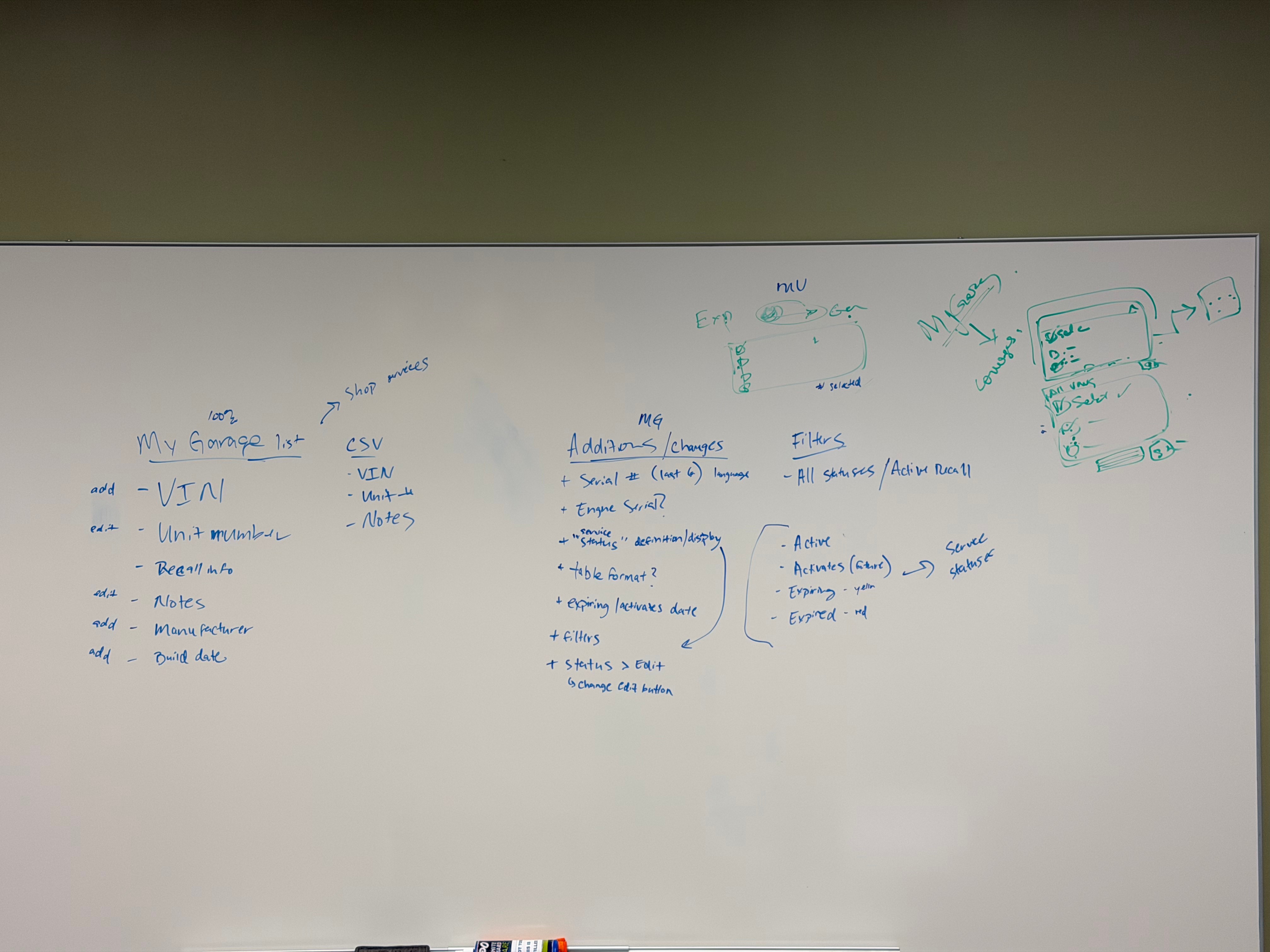
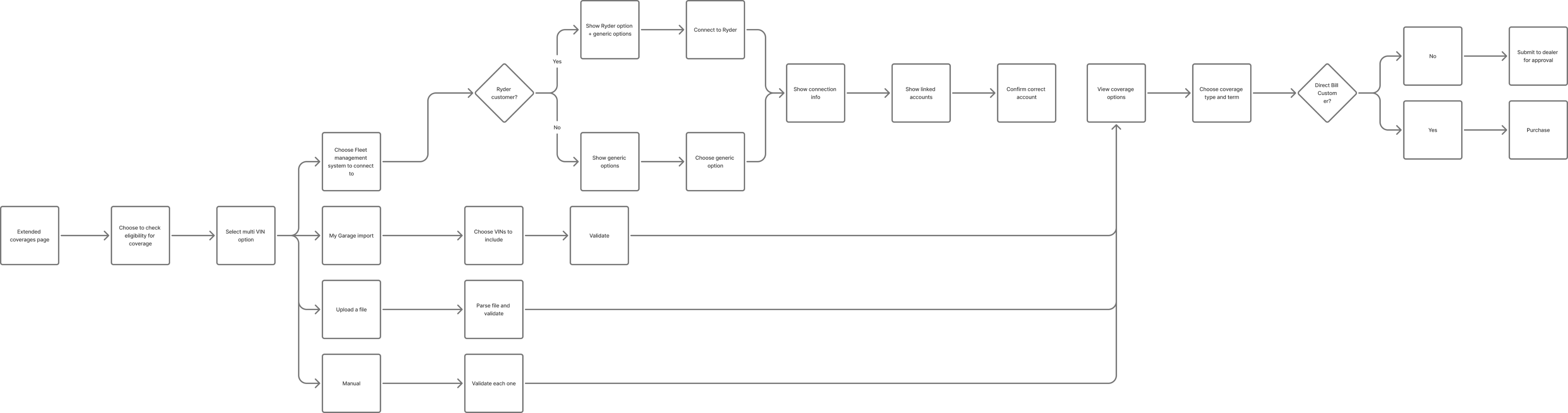
Iteration - input
One of the big constraints we face is with our data sources. Platforms like OWL (Online Warranty Links), which is the ultimate source of truth, are outdated and can only provide so much information at a certain speed. So fancy data pipelines aren’t feasible.
Pulling inspiration from apps like Linear, Stripe and even Mercury Banking, I saw how they organize information like tables and ancillary actions and information to be as helpful as possible.
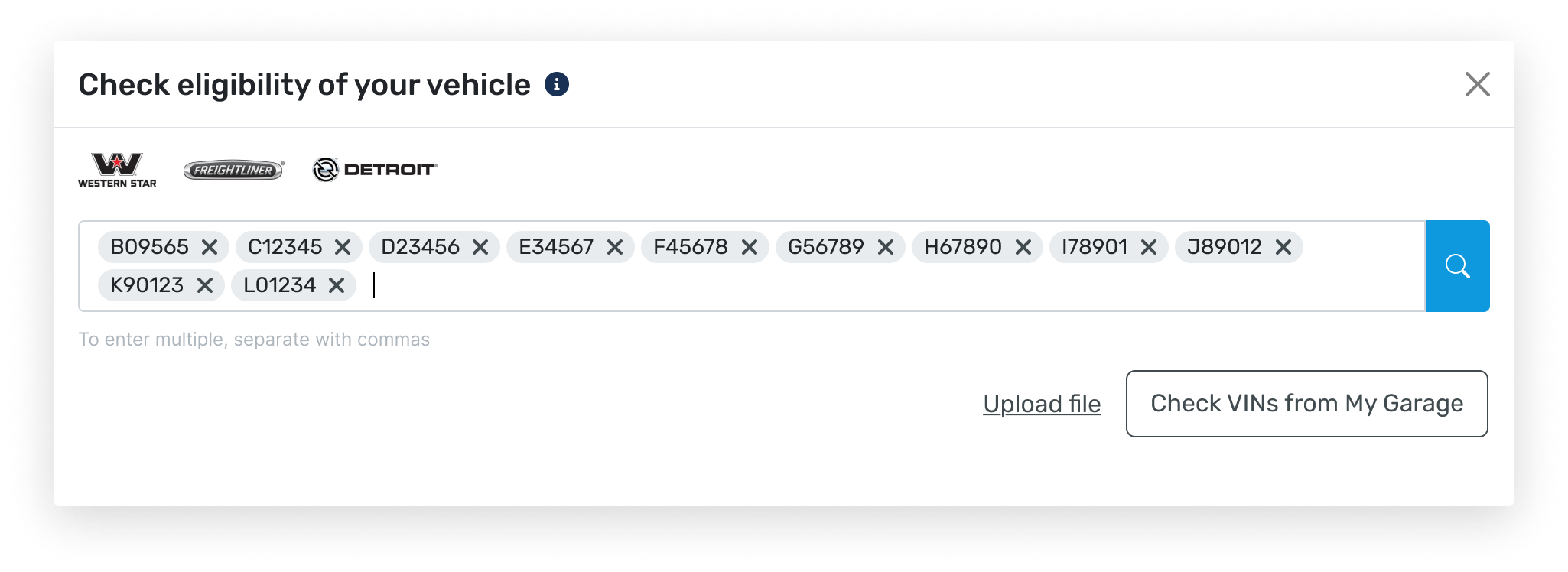
This first iteration was slick and, to me, easy to use. We would reuse the existing input and just add multi-entry functionality and a way to upload vehicles or link to their existing Garage. But after putting in front of some of our customers, the multi-entry input field was unfamiliar. I realized it’s a modern pattern that doesn’t show up in their day-to-day. Most of the software they use isn’t modern.
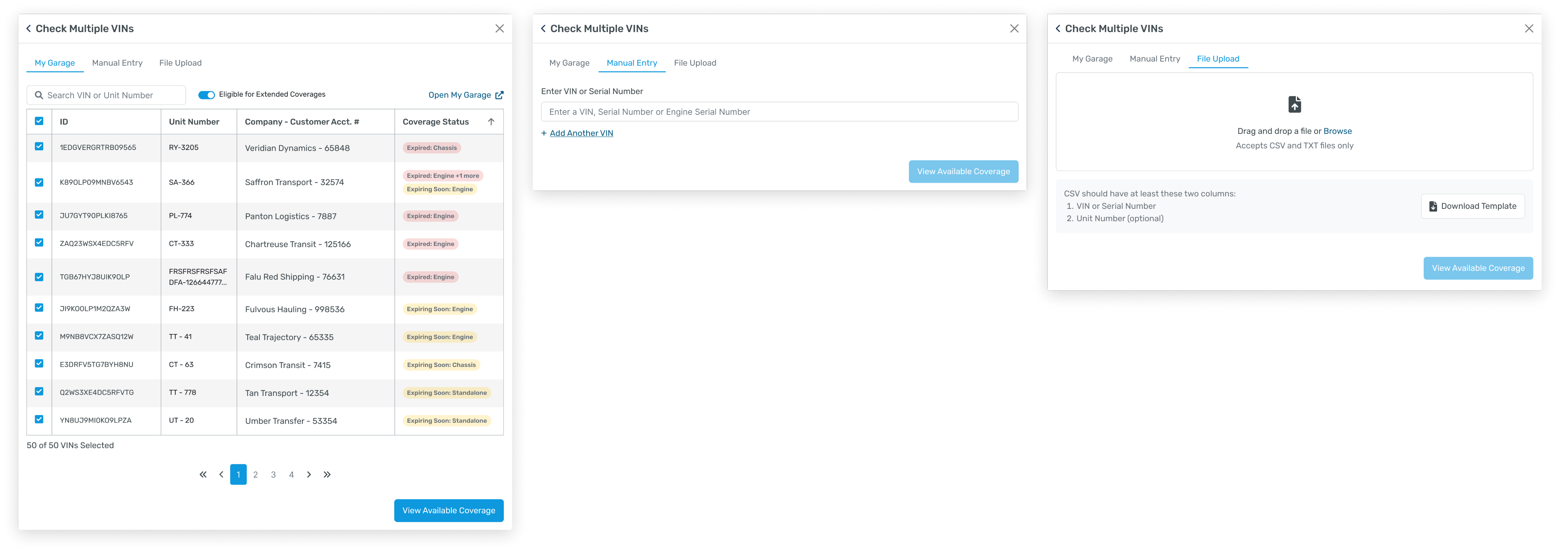
So I considered a more familiar way to select and input information and just separated them into their own section. After some refinement on what info to show in each section I landed on something like this (below).
Iteration - output
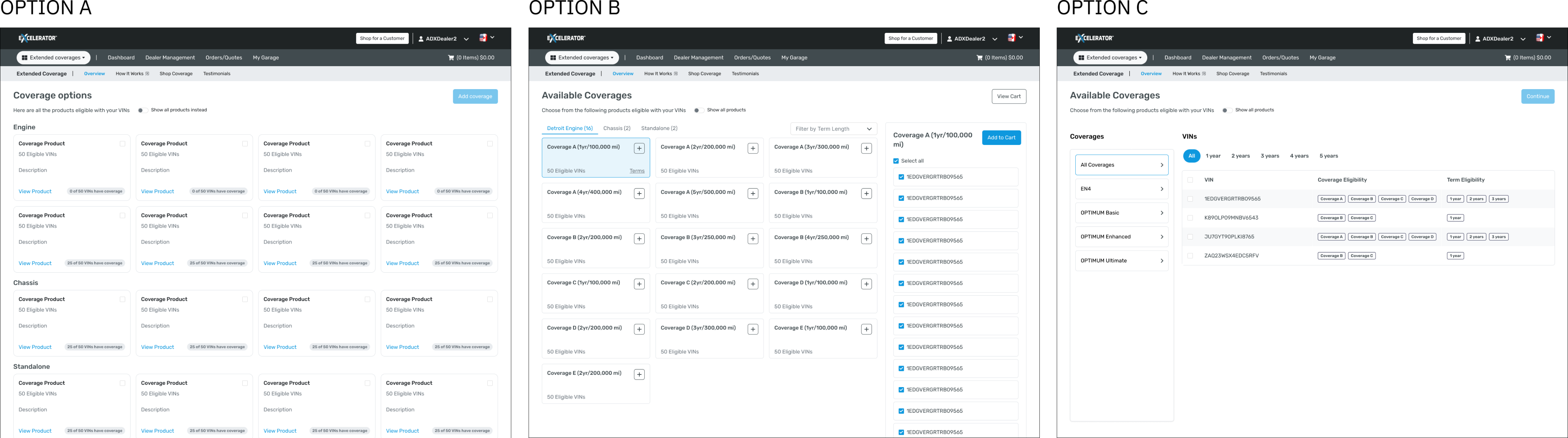
The output was much more fuzzy. Nothing existed like this on the platform yet. I wasn’t clear on what info was most important to a customer so I went in a few different directions to start.
The first option centered the coverages but added a second step as a click-in. Option B centered the coverages but put it all on a single step. The last option centered the vehicles and added a modal as a second step.
Feedback
We put this in front of a group of influential, outspoken customers.
I got a lot of good feedback on the initial iteration. Some of the feedback was more related to improvements we could make to other parts of the site that relate to this effort, so we just had to keep the conversation focused on what was in front of them.

I want an easier to way to tell which trucks have what coverage
I want the fastest option possible, I don’t have a lot of extra time
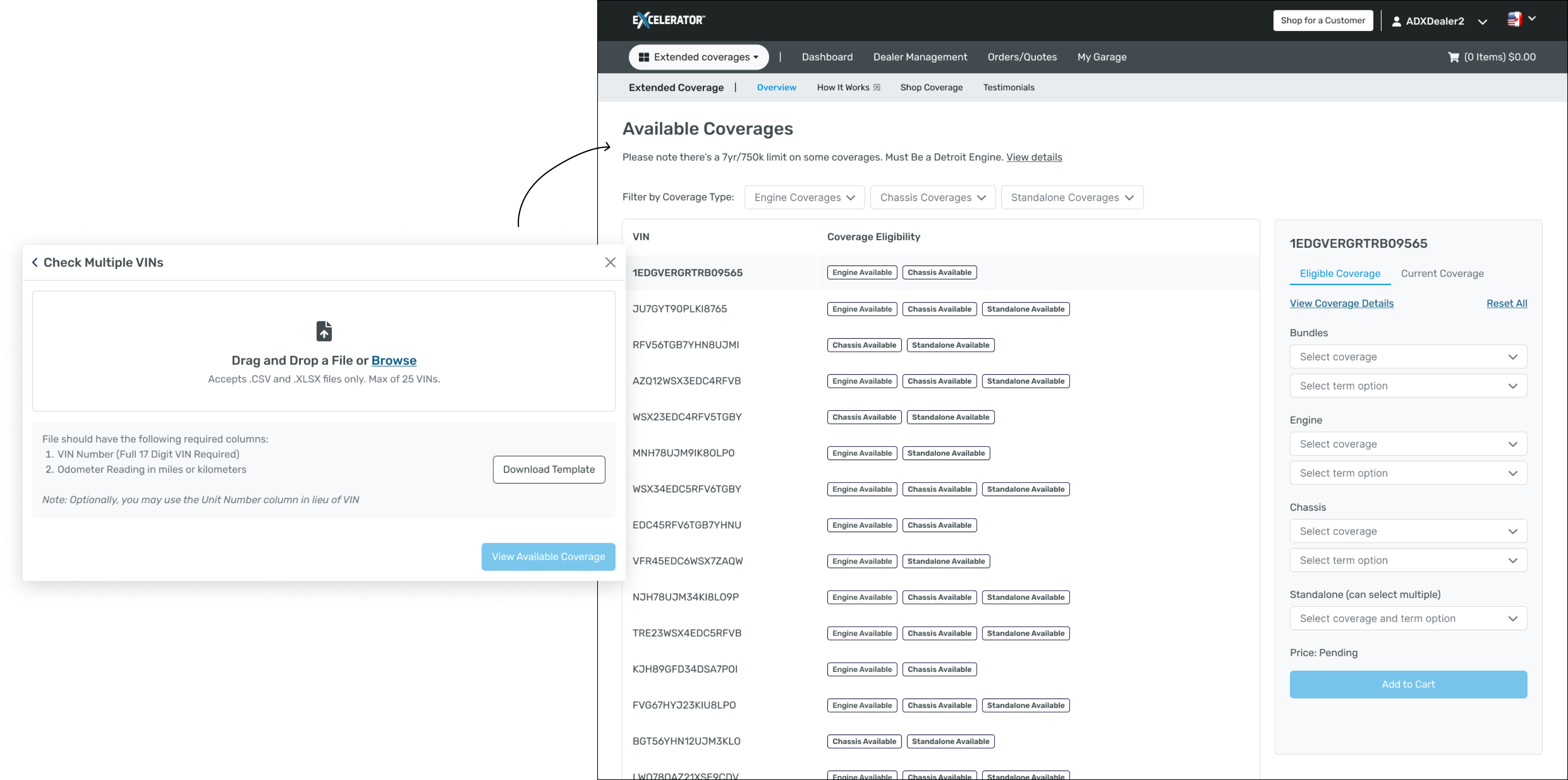
Based on the customer feedback, to make it easier and faster to take action, I brought the input (list of vehicles) and output (coverage for those vehicles) closer together. I made the primary view on the output the list of vehicles with a sidebar that shows eligible and current coverage. I added the ability to manipulate to their hearts content so they can see how their selections change what options are available to them.
Reduction in scope
After several conversations with the technical team, they realized that the complexity of the inputs (My Garage, Manual, Upload) was too much for the delivery timeline. We we either tried to build everything and risk not delivering anything in the next release (the roadmap was already full) or reduce the scope and risk delivering an MVP that didn’t hit the mark.
So we chose the latter to at least deliver something of value, which I agreed with. We chose the simplest path the developers thought they could finish which was Document Upload. (Uploading a document spits out a list of vehicles and their eligible coverage for you to then add to your cart and purchase)
What’s next
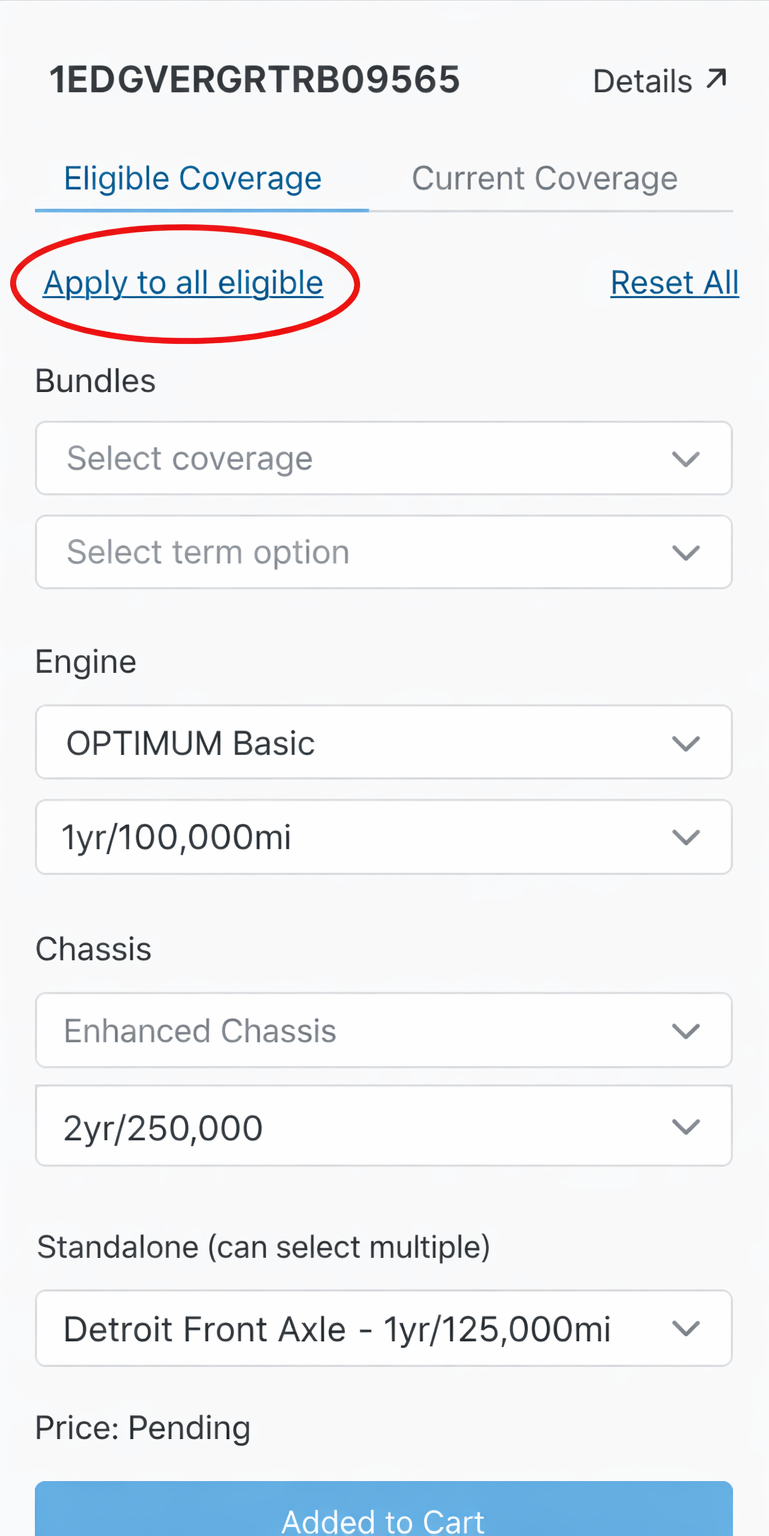
One of the big pieces of feedback I want to implement is a way to apply chosen coverage options to other vehicles. The idea here is to take the current selection, figure out which other vehicles in the list have the same available eligibility terms and add everything all that to the cart to speed up their workflow even more.
Purchase coverage for a truck fleet
Role
Lead designer
Timeline
December 2025 - March 2026
Problem
It takes roughly 6 minutes to find coverage for a single vehicle. That’s not feasible for a large company with thousands of vehicles. We had to make it easier for them.
Process
- Gain understanding and discovery
- Iteration
- User testing with dealer group of 12 decision-makers
- Reduction in scope
- What’s next
Gaining understanding
Today, to find coverage for a single vehicle, there’s a manual input of a vehicle’s VIN Number, a lookup happens in the background, and they’re shown coverage options based on that vehicle. A simple input/output.
But I knew that probably couldn’t happen here in the same way. We wanted to save people time and manually entering VIN Numbers wasn’t going to do that.
So I started by learning as much as I could about how customers do this today.
- I used the staging environment to go through purchasing different kinds of vehicles.
- I sat in on meetings with leadership and people that have been at the company 5+ years to learn about the details of how customers select coverage options.
- I asked Claude things like, “imaging you lease out trucks to other companies, how would you purchase coverage for a truck with expiring coverage and how do you get to that decision.”
I learned a few things in the process:
- There’s no one way that every dealer or customer organizes their vehicle data, so we’d need to provide at least a couple different options for them to do that.
- There isn’t a central fleet management service that everyone uses, it’s a scattered landscape.
- To “input” a lot of data at once, there are some familiar conventions I could leverage that the system has built-in already.
- Customers often get frustrated by road blocks we’ve historically put up in our product.
Iteration - input
One of the big constraints we face is with our data sources. Platforms like OWL (Online Warranty Links), which is the ultimate source of truth, are outdated and can only provide so much information at a certain speed. So fancy data pipelines aren’t feasible.
Pulling inspiration from apps like Linear, Stripe and even Mercury Banking, I saw how they organize information like tables and ancillary actions and information to be as helpful as possible.
This first iteration was slick and, to me, easy to use. We would reuse the existing input and just add multi-entry functionality and a way to upload vehicles or link to their existing Garage. But after putting in front of some of our customers, the multi-entry input field was unfamiliar. I realized it’s a modern pattern that doesn’t show up in their day-to-day. Most of the software they use isn’t modern.
So I considered a more familiar way to select and input information and just separated them into their own section. After some refinement on what info to show in each section I landed on something like this (below).
Iteration - output
The output was much more fuzzy. Nothing existed like this on the platform yet. I wasn’t clear on what info was most important to a customer so I went in a few different directions to start.
The first option centered the coverages but added a second step as a click-in. Option B centered the coverages but put it all on a single step. The last option centered the vehicles and added a modal as a second step.
Feedback
We put this in front of a group of influential, outspoken customers.
I got a lot of good feedback on the initial iteration. Some of the feedback was more related to improvements we could make to other parts of the site that relate to this effort, so we just had to keep the conversation focused on what was in front of them.

I want an easier to way to tell which trucks have what coverage
I want the fastest option possible, I don’t have a lot of extra time
Based on the customer feedback, to make it easier and faster to take action, I brought the input (list of vehicles) and output (coverage for those vehicles) closer together. I made the primary view on the output the list of vehicles with a sidebar that shows eligible and current coverage. I added the ability to manipulate to their hearts content so they can see how their selections change what options are available to them.
Reduction in scope
After several conversations with the technical team, they realized that the complexity of the inputs (My Garage, Manual, Upload) was too much for the delivery timeline. We we either tried to build everything and risk not delivering anything in the next release (the roadmap was already full) or reduce the scope and risk delivering an MVP that didn’t hit the mark.
So we chose the latter to at least deliver something of value, which I agreed with. We chose the simplest path the developers thought they could finish which was Document Upload. (Uploading a document spits out a list of vehicles and their eligible coverage for you to then add to your cart and purchase)
What’s next
One of the big pieces of feedback I want to implement is a way to apply chosen coverage options to other vehicles. The idea here is to take the current selection, figure out which other vehicles in the list have the same available eligibility terms and add everything all that to the cart to speed up their workflow even more.