no. 018 · the tight-lipped species
Sign-up that doesn’t give away who has an account
A user story asked Excelerator’s sign-up to stop revealing which emails have accounts. I prototyped it with Claude before sprint planning to find where it still leaked, starting with the cart.
stats
- blockers in the story, found before planning
- 2
- flows checked for the same leak
- 7
- password rules that didn’t match the connected portal
- 5 of 5
moves
- try it
- gaps in the thinking
- link or code
- the cart
field notes
Some sign-up forms tell you when an email already has an account. That sounds helpful, but it means anyone can type in a list of emails and find out which ones are customers. It’s called account enumeration, and on Excelerator that list would be a list of fleets buying parts from us.
We had a user story to close it in registration, and most of it was good. Sign-up would start with only an email field. Every address would get the same message: “To continue with registration, please check the email you provided.” A new address would get a one-time link to the rest of the form. An existing one would get an email asking if it was them, and repeat attempts would send our team a security alert.
I wanted to see it before sprint planning. I pasted the story into Claude Design and asked it to prototype the flow and tell me if there were any gaps in the thinking. I also asked it to check forgot password and any other flows with the same problem.
Claude found the first round of gaps. Most of what came after came from clicking through the prototype myself and knowing the product.
Try it
Gaps in the thinking
Claude came back with a list before it built anything. The big one was the cart. The cart has its own email field, and the story had it behave differently: a known email went to the login page, and a new one got “Not able to proceed, check your email for more details.” Two different answers, so anyone could use the cart to find out what registration was hiding. The story already had a note that the cart needed another look. This showed why. I had both versions of the cart built side by side so the team could pick in planning.
Two acceptance criteria also didn’t line up. One said an existing customer always gets an email when someone tries to register with their address. The next said “the second email” only goes out after repeat attempts. Neither of us could tell which email that meant.
The list had smaller ones too:
- The link was used up on the first click, and a long form came after it. Refresh the page and you were locked out.
- There was no resend, and no way to fix a typo in your email.
- An expired link sent you back to the first step with an empty field and no explanation.
- The story assumed the cart would come back like it does today. It won’t if you open the email on your phone.
- Some messages read like they were written for developers: “Email does not match the original submission.”
Link or code
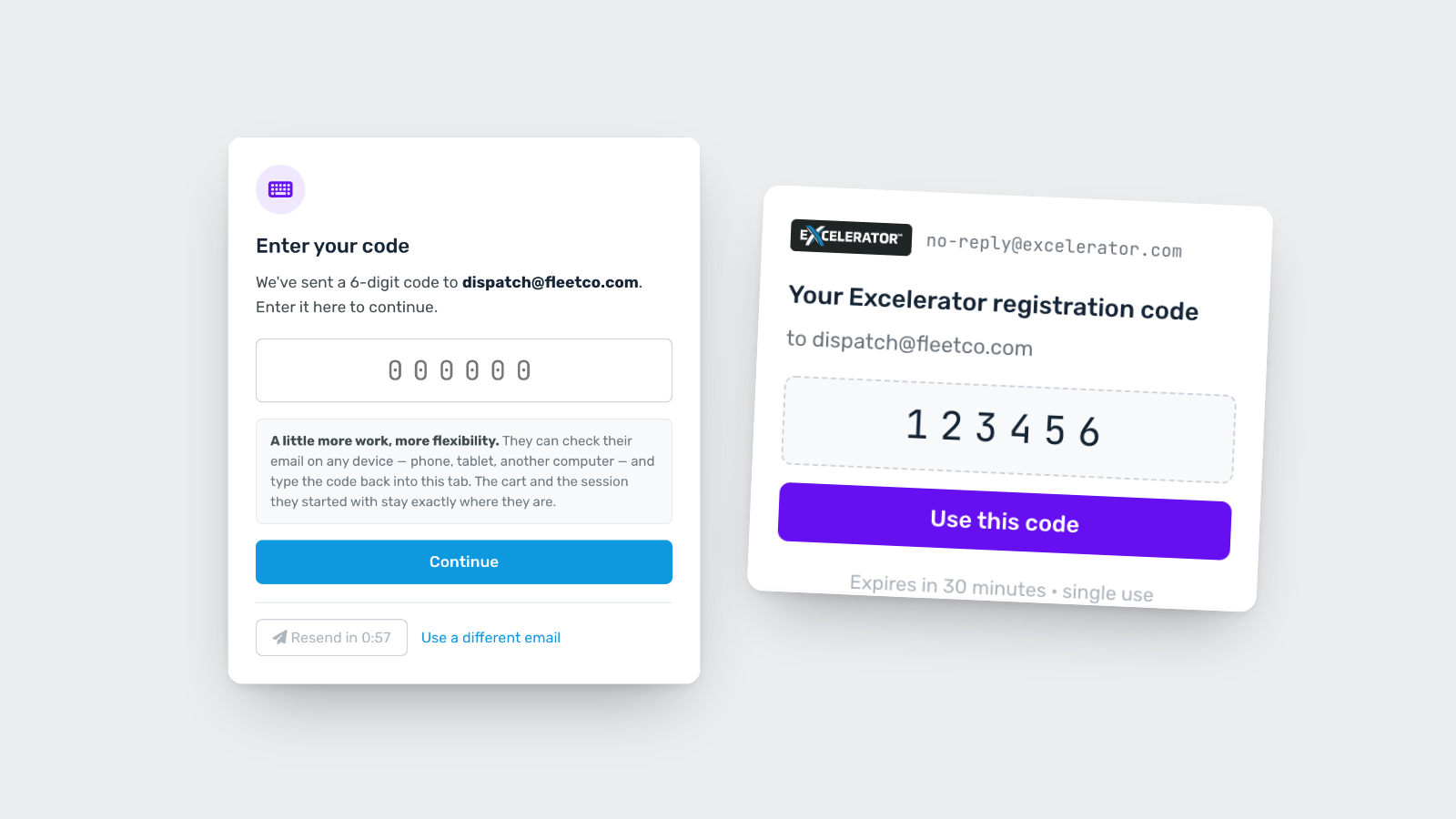
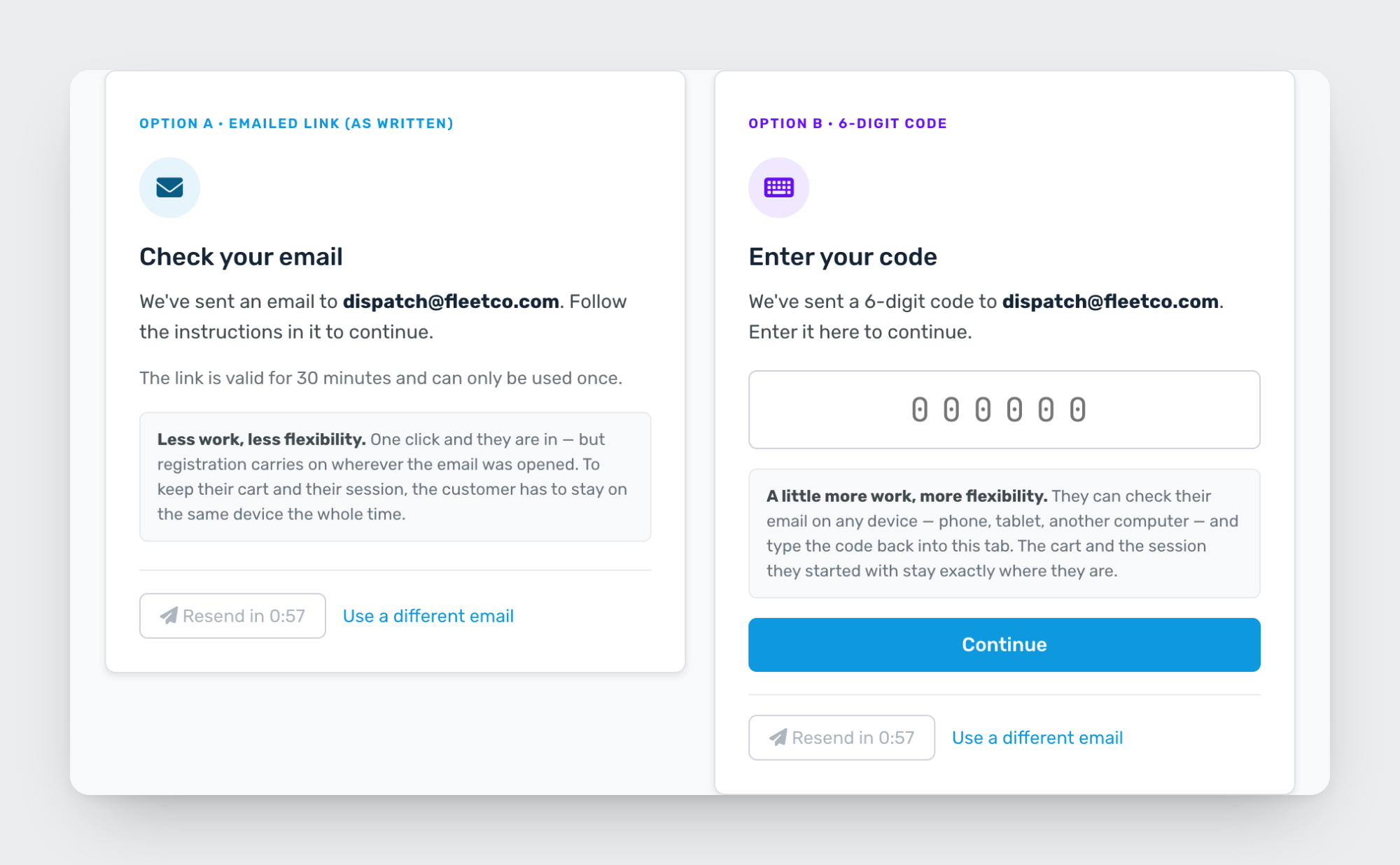
The story used a link. Claude suggested trying a 6-digit code next to it, so I had both built and switchable. After using both, here’s how I’d put it: a link forces the customer to stay on the same device the whole time. A code lets them check their email on a different device and type it in where they started. It’s a little more work for more flexibility. Claude pointed out who that matters for: people who read work email on their phone while the order is on a shop computer.
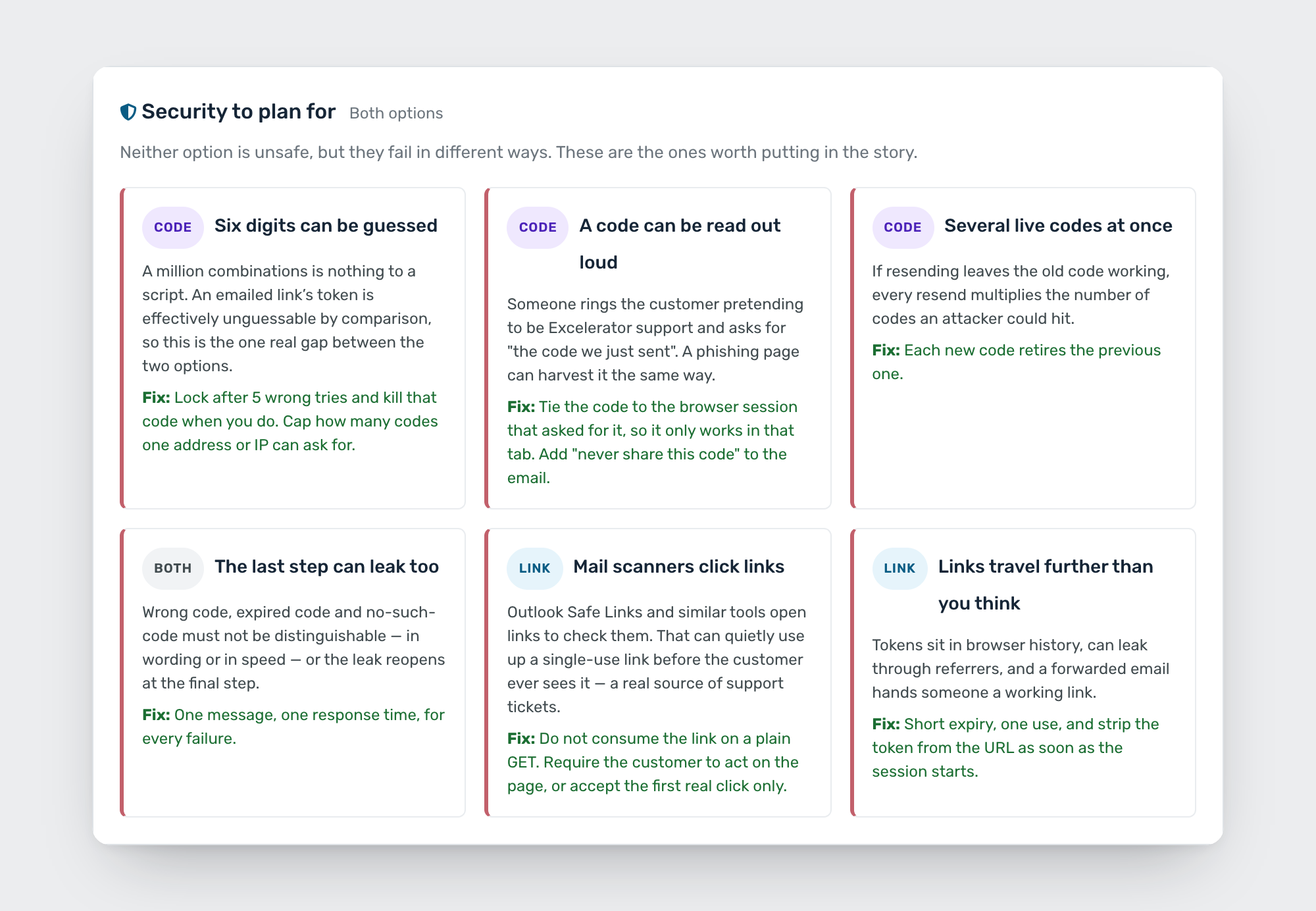
Then I asked what the risks were. Some were new to me. Company email filters often click links to check them, which can use up a one-time link before the customer ever sees it. Codes have their own: six digits can be guessed if nothing stops it, so the code needs a lockout after 5 wrong tries. A new code should cancel the old one. And someone pretending to be support could ask a customer to read their code out, so the code should only work in the tab that asked for it. I had each risk added to the prototype next to its fix.
The cart
Next I brought in our real cart page and asked what had to change to follow the same rules. Now every email gets the same reply: we’ve sent you a code. Known and new emails only go different ways after the code is entered. By then you’ve shown it’s your inbox, so there’s nothing to give away. There’s also a line under the greyed-out checkout buttons saying why they’re locked, because today they don’t say anything.
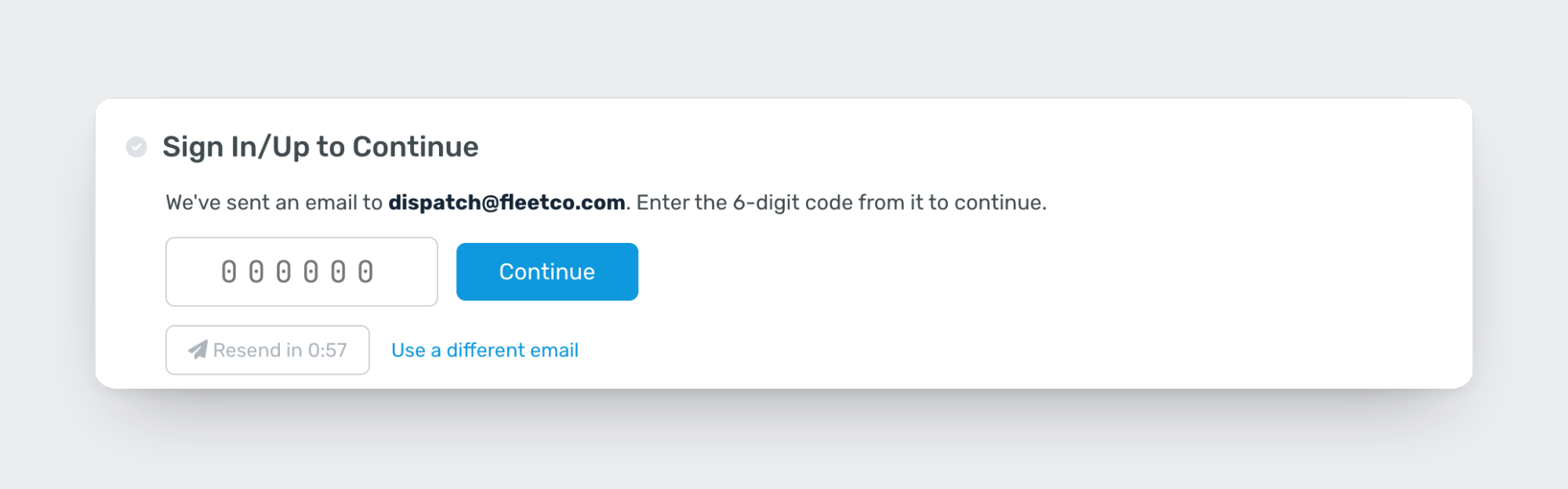
If the email doesn’t exist
Clicking through, I noticed a dead end. If you had no account and tried to sign in, you saw “check your email” and nothing ever came. I asked for a way forward. The screen still can’t tell you there’s no account, because that’s the leak. So the email does. An address with no account gets “You don’t have an Excelerator account yet” and a button to create one. Only the person who owns that inbox finds out.

No password on sign-in
I brought in the new sign-in page and asked for it to follow the same rules. The first version gave one message for every failure and locked you out after 5 tries. But “no account with that email” and “wrong password” are still two different situations, and keeping them identical depends on everyone getting the wording right forever. So I decided to take the password field out. You enter your email, get a code, and you’re in. It’s the same screen as registration, so there’s only one answer to get.
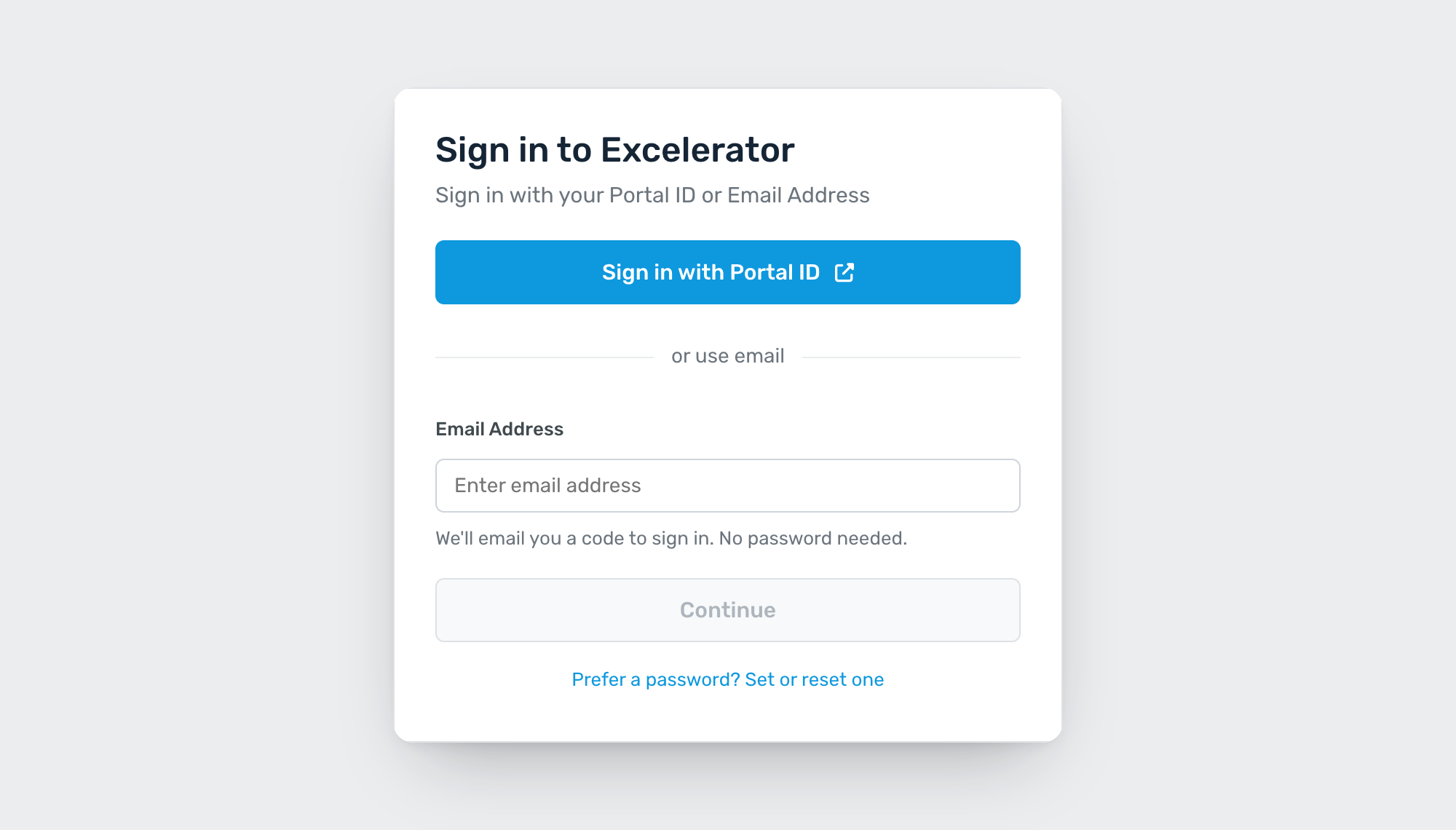
That raises a bigger question I haven’t answered yet: whether we keep passwords at all.
Making the flows match
I noticed registration and forgot password handled their links differently. Registration gave you time to finish the form after clicking. Forgot password used the link up and left you there. Now they match: the link lasts 30 minutes, works once, and gives you 20 minutes to finish.
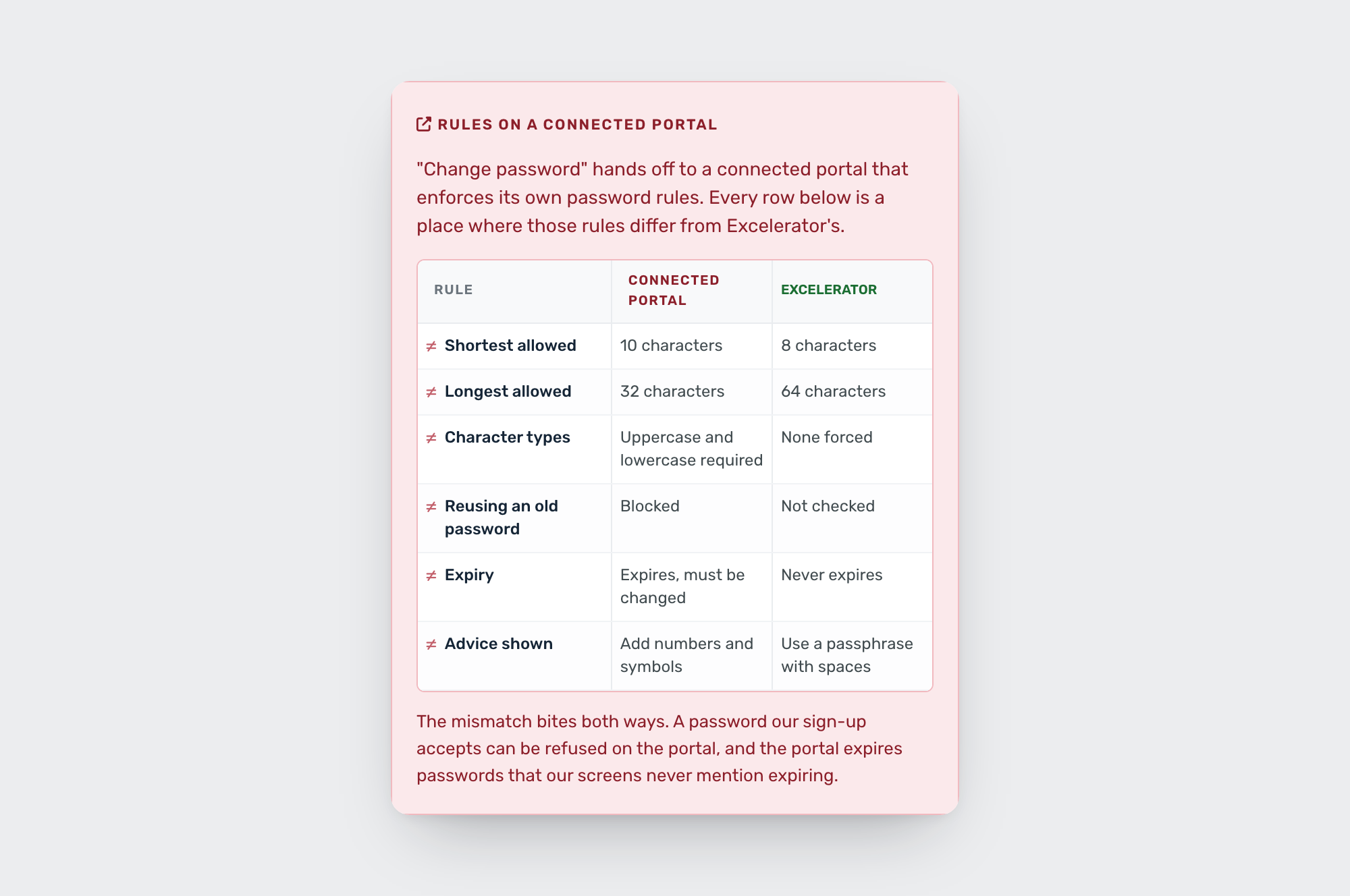
Change password was stranger. I knew our site has a change password option that sends people to another Daimler portal with its own rules, so I added screenshots of that portal. I’ll need to ask around to see if we still need it at all. When I put the two sets of rules side by side, all 5 were different: 10 characters minimum there and 8 with us, 32 maximum there and 64 with us, uppercase required there, reused passwords blocked there, and passwords that expire there and never with us. So people could set a password with us that the portal would turn down.
Where Claude guessed
Claude gave me a list of other flows to check, including resend verification, change email and a newsletter signup. I asked how it knew those pages existed. It didn’t. It assumed, because most sites have them. So I had it label every flow with where it came from: my story, my screenshots, the design system, or a guess. I know the product, so I took out the three we don’t have.
I also asked it to use simpler language. “Enumeration oracle” turned into “anyone can test which emails have accounts.” The people in planning shouldn’t need a security glossary to read it.
What I brought
Claude was fast at building screens and good at spotting holes in a spec. What it couldn’t do:
- Know which pages exist on Excelerator and which ones it made up.
- See the other Daimler portal and its rules until I showed it.
- Bring in the real cart and sign-in pages.
- Add the new password rules from my password requirements work to account creation.
- Decide what to settle myself, like taking passwords off sign-in, and what to put in front of the team, like the link and the code side by side.
Still open
The prototype was built for sprint planning. You can flip between the link and the code or compare them side by side, switch to mobile, turn on notes for each screen, and open every email from a fake inbox. The team version also has a page of open gaps with rough sizes. The copy here leaves that out, along with anything about how the live site works today.
What’s still open: whether passwords stay, the limits on the code, and what the Portal ID sign-in says when it fails. That page belongs to another team.